Your blog
Multilingual blogs
If you want to reach multiple audiences, you can create language versions of your blog.
With Writizzy you would have:
- A French blog for your French-speaking readers, e.g. https://monblog.fr
- An English blog for your English-speaking readers, e.g. https://myblog.com
The same article can exist on both blogs, with a link between them so readers can switch languages easily. Example:
This feature builds on multi-blog — you need at least two blogs on your account.
Here's how to set it up.
Step 1 — Connect your blogs
Go to Settings → Localization, find the Language variations section. Select another blog from your account to connect them.
This is bidirectional — connecting A to B also connects B to A.

Step 2 — Link individual posts or generate translations automatically
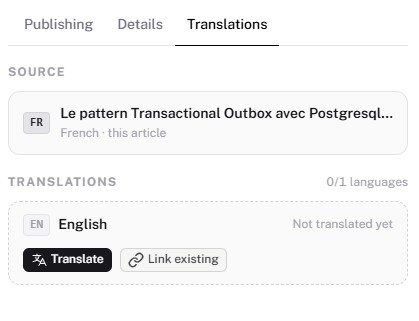
Open a post in the editor. A Translations panel appears in the right sidebar (only visible if you have at least two blogs with a language set).
- Click Link existing, pick the target blog, search for the corresponding post, and confirm. The link works in both directions automatically.
- click Translate to generate a draft on the target blog. The content is translated automatically. The operation takes a few moments — check the target blog to see when the draft is ready. You review and publish it yourself.
Once linked, both posts show a language switcher for readers. The switcher only appears when the linked post is published.
FAQ
Why not just run two separate blogs without linking them? Search engines may treat two posts on the same topic in different languages as duplicate content, even if they're clearly distinct. Linking them tells search engines the posts are translations of each other, not copies — so neither gets penalized.
Does Writizzy handle the SEO side correctly?
Yes. Each linked post automatically gets hreflang tags in its <head>, declaring all language alternatives to search engines. You don't need to configure anything.
What happens if I delete a translated post? The translation link is removed, but the other post is not affected.
What if I delete an entire blog? The other blogs are not affected, but all translation links involving that blog's posts are removed.
Do I need to translate all my posts? No. Linking is done post by post. You can translate only your most important articles and leave the rest untranslated. There's no obligation to keep both blogs in sync.
Will my newsletter be sent to subscribers of both blogs? No. Each blog has its own subscriber list. A newsletter sent from your French blog only goes to that blog's subscribers. Your English blog subscribers won't receive it.
What do readers see when a translation is available? It depends on the theme, but readers will see a suggestion pointing to the translated version. It's not a language switcher — it's a notice that another version of the article exists.
I already have translated posts. Can I link them without creating new ones? Yes. Open either post, go to the Translations panel, click Link existing, and select the corresponding post. Nothing is duplicated or overwritten.
Can I link posts across different accounts? No. Links only work between blogs on the same account.