Migrating paid subscribers
Coming from Substack or Ghost with paying subscribers? You can bring them over without asking anyone to re-subscribe or re-enter their card. Their subscriptions keep running, uninterrupted.
This works because Substack and Ghost both run payments through Stripe, on an account that belongs to you. When you connect that same Stripe account to Writizzy, your existing subscriptions are already there. Writizzy reads them directly and links each one to a member on your blog.
Your posts and free subscribers are imported separately. See Import Content for those.
How it works
1. Connect your Stripe account
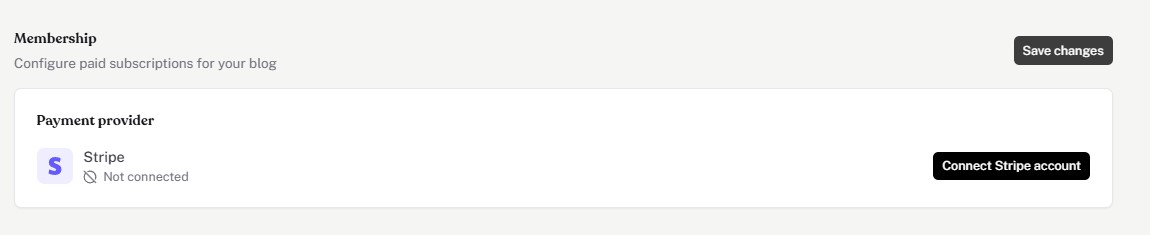
Go to Settings → Membership and click Connect Stripe account. Sign in with the same Stripe account you used on Substack or Ghost.
2. Review what was found
Right after connecting, Writizzy checks your Stripe account for active paid subscriptions. If it finds any, a banner shows how many: "N paid subscribers found in your Stripe account."

3. Import them
Click the banner, confirm the count (you'll see a sample of email addresses as a sanity check), and start the import. Each subscription is matched to a member by email and kept on its current plan and price. You can re-run the import safely: subscribers already imported are skipped.
4. Import your free subscribers separately
Paid subscribers come from Stripe; free subscribers come from your email export. Follow your platform's section in Import Content, then add the list under Settings → Import → Subscribers.
Before you disconnect your old platform
This is the one step that can go wrong, so read it before touching anything. Connecting Stripe and importing (above) works the same whoever you're coming from. Cutting ties with your old platform is where Substack and Ghost differ — follow the section for yours.
First, whichever platform you're on: connect Stripe to Writizzy, run the import, and confirm your paid subscribers show up under Members. Only touch your old platform once that's verified.
Coming from Substack
You disconnect Substack for one reason: the 10% fee it keeps skimming off every renewal for as long as it stays connected to your Stripe account. It's not a charge-safety issue — no one is ever double-charged — it's about keeping 100% of your revenue. There's a right way and a very wrong way to do it.
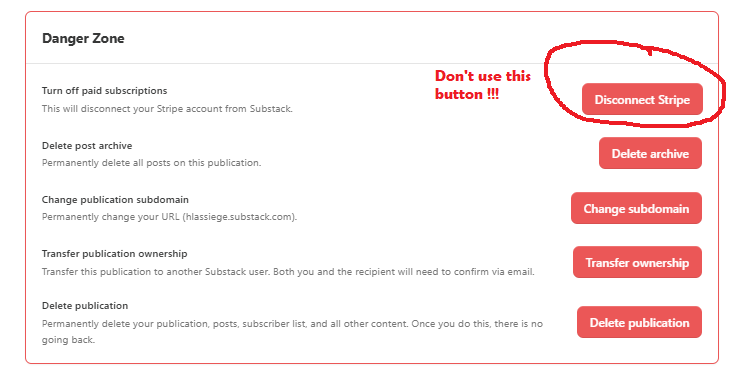
Instead, ask Substack support to disconnect Stripe without canceling subscriptions. This does two things at once:
- It keeps every subscription running.
- It clears that 10% fee for good, so you keep 100% of your revenue.
How to ask Substack
There's no button for this, a human on Substack's side has to do it. Here's how it goes in practice.
1. Reach a real person. Support opens on a chatbot that can't do this. Ask it to put you through to a human, or to pass your request to the billing/engineering team.
2. Send this. Copy, fill in the two bracketed lines, and send:
Subject: Disconnect Stripe without canceling my subscriptions

Hi Substack Support,

I'd like to disconnect my Stripe account from my Substack publication
without canceling or refunding my readers' active subscriptions.

I know the "Disconnect" button in the dashboard cancels every active
subscription, so I'd like your team to do it on the backend instead,
leaving the recurring subscriptions running on my Stripe account.

To be clear: I'm moving my paid content to another platform, and I want
to keep every active subscription intact and stop the Substack fee on
future renewals.

Could you handle this, or pass it to the billing team?

Thanks,
[Your name]
[Your publication name / URL]
3. Confirm when they ask. Support replies to double-check before acting. They'll ask you to confirm that you want to disconnect without canceling or refunding, and that you're moving to another platform. They may also offer to remove the paywalls from your posts, that's up to you. Say yes, and they do it.
You'll get a confirmation that the Stripe account is disconnected, the fee is removed, and Substack's access to your Stripe account is revoked. That's the moment your subscriptions are fully yours again.
Once that's confirmed, delete your Substack publication last.
Coming from Ghost
Ghost is simpler: no platform fee to clear, and no refund trap like Substack's button. Because the Stripe account is yours, your subscriptions don't depend on Ghost — once they're imported and verified on Writizzy, they keep running on their own.
To stop Ghost from also touching them, ask Ghost support to disconnect Stripe without canceling subscriptions, then delete your Ghost site last. Do this only after you've confirmed the import.
Good to know
- Prices stay as they were. A subscription keeps the price it had on your old platform, even if it differs from the price you set on Writizzy. Renewals continue at the original amount.
- Renewals and cancellations just work. Once linked, a subscription's renewals, cancellations, and payment failures are handled automatically, exactly like a subscription started on Writizzy.
- A member found as both free and paid ends up as a single paid member, with no duplicate.
- You need the same Stripe account. The one connected to Writizzy has to be the account that holds your Substack or Ghost subscriptions. A brand-new Stripe account won't have them.